
 Sign in with Telegram
How to Use Stripe Connect for Telegram Memberships
Connect your own Stripe account for Telegram VIP memberships: onboarding, checkout charges, application fee, and how access stays separate from payouts.

Stripe Connect is how a membership product charges cards on your Stripe account instead of parking revenue in a vendor wallet. For Telegram VIP channels and groups, that split is the whole architecture: Stripe moves money for the connected account; the membership app opens and closes the door.
This guide is Connect-mechanics focused. For the creator-facing checkout-to-kick narrative, use Accept Stripe payments in a Telegram group.
Key takeaways
- Connect exists so platforms can process payments for connected accounts that belong to sellers.
- You onboard once with Stripe, then Telegram membership checkouts charge through that account.
- MemberPilot never holds creator revenue. Customers pay a 5% service fee at checkout; creators pay no monthly fee.
- Access automation (invites, removals, grace) is separate from Stripe payout schedules.
What Stripe Connect is doing here
Stripe describes Connect as the way platforms and marketplaces move money between customers and connected accounts. Charge types differ in where funds first appear (Connect charges), but the product rule that matters for creators is simpler: your connected account is where card sales settle, and MemberPilot does not keep a creator sales balance.
Think in two systems:
| System | Owns |
|---|---|
| Stripe Connect | Cards, retries, refunds, payouts to your bank |
| Membership app | Offers, Telegram bot, invites, removals |
If a guide collapses those into "the bot accepts Stripe," mistrust it. The bot is not the processor.
How to connect Stripe for Telegram memberships
1. Create or use a Stripe account Stripe supports
You need a Stripe account in a country Stripe supports for the capabilities you need. You do not need to ship your own Checkout integration. The platform starts Connect onboarding for you.
2. Start Connect onboarding from Payments
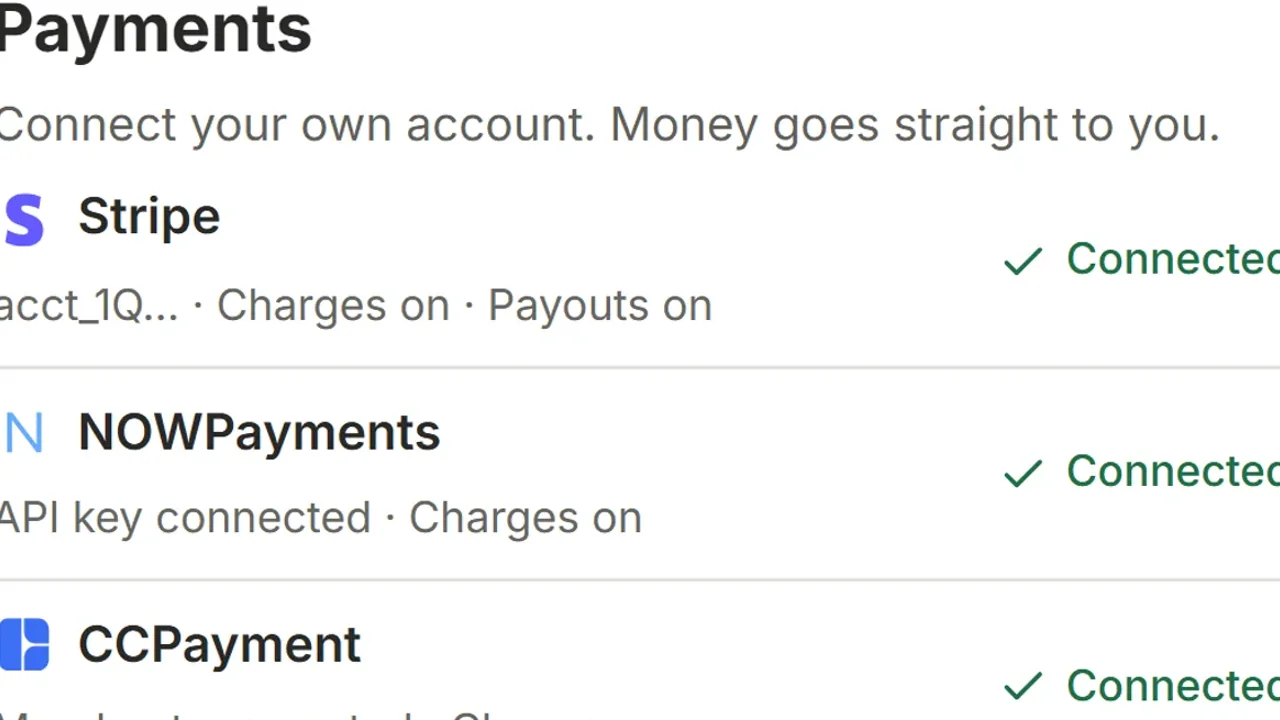
In MemberPilot, open Payments and connect Stripe. Stripe hosts the onboarding. You approve the connection and return with a connected account. From that point, card memberships can charge through that account.
3. Confirm charges and payouts are enabled
In the Payments list you should see Stripe marked connected with charges (and payouts) available for that account. If onboarding is incomplete, finish Stripe's requirements before you sell. Payouts to connected accounts still follow Stripe's payout settings once funds sit in the connected balance.
4. Create the Telegram membership offer
Create an offer, attach the private channels or groups it unlocks, and set monthly or yearly price. You keep the price you set. At web checkout the customer sees your price plus MemberPilot's 5% service fee (a $20 plan charges the customer $21). Stripe's processing fees remain Stripe's.
5. Share checkout; let Connect and access run their jobs
Post the checkout link. After Stripe confirms payment, the membership activates and the buyer gets a short-lived secure Telegram join path. Failed renewals, cancellations, and expirations update access from the membership period and your grace settings. Stripe continues to own retry behavior for subscription invoices; the app owns when Telegram access ends.
Fee collection on Connect vs crypto
With Stripe, the 5% MemberPilot service fee is collected at checkout. With NOWPayments or CCPayment, some crypto rails cannot split that fee in-payment, so MemberPilot records the fee and bills it later through your MemberPilot billing method. Sales still settle to your connected crypto account. PayPal, Binance Pay, and Telegram Stars are not available.
Connect myths to skip
- Myth: "Connect means the platform holds my money for 14 days."
Fact: MemberPilot does not run a creator payout wallet. Stripe pays out from the connected account per Stripe's schedule. - Myth: "I need webhooks and code to sell Telegram access."
Fact: You need onboarding, an offer, and a bot with invite/restrict rights. The platform wires the events. - Myth: "Connect replaces auto-kick."
Fact: Connect never removes a Telegram user. Access policy does.
For why creators insist on this model, read 6 reasons to keep payouts in your own Stripe account.
MemberPilot is an independent third-party service and is not affiliated with or endorsed by Telegram.
Connect Stripe, then sell the seat
Finish Stripe onboarding, publish one offer, and keep payouts on the account you already trust. Start for free, or see pricing for the fee line buyers will see at checkout.
Frequently asked questions
- What is Stripe Connect in a Telegram membership setup?
- Stripe Connect lets a software platform route card payments for connected accounts that belong to creators. You complete Stripe's onboarding, then membership checkouts charge through your connected account while the app handles Telegram invites and removals.
- Does MemberPilot become my Stripe account?
- No. You connect your own Stripe account. Card sales settle to that connected account. MemberPilot never holds your revenue. The 5% MemberPilot service fee is collected at checkout on top of your price.
- How is this different from a general Stripe-for-Telegram guide?
- The checkout-to-kick walkthrough lives in the Stripe payments guide. This page focuses on Connect mechanics: onboarding, connected balances, payouts, and how the platform fee sits beside your price.
- Do I write Stripe API code to sell Telegram access?
- No. In MemberPilot you start Stripe's hosted onboarding from Payments, return when the account is connected, then create offers. Stripe owns card processing; the app owns access automation.
Sources
- Stripe Connect documentation · Stripe
- Create Connect charges · Stripe
- Payouts to connected accounts · Stripe