
 Sign in with Telegram
How to Charge Monthly for a Private Telegram Group
Set a monthly price for a private Telegram group, take card or crypto at checkout, auto-invite paying members, and remove access when the month ends.

You want a private Telegram group that costs money every month, without becoming the billing department. Telegram gives you the chat. It does not give you recurring card billing or a reliable way to remove people when the month ends.
Here is how to charge monthly for a private telegram group: set a monthly offer, take payment on accounts you own, invite payers automatically, and remove access when the paid period ends.
Key takeaways
- Monthly access needs your own Stripe account for card subscriptions; crypto is prepaid one period at a time.
- Paying members get a short-lived invite after payment confirms.
- Cancelled or expired members leave at period end + grace (grace defaults to 0 days).
- You keep the price you set; customers pay a 5% service fee at checkout. No monthly platform fee.
- MemberPilot never holds your revenue.
What you need before the first charge
- A private Telegram group you control (or a private channel if that fits the product better; MemberPilot supports both).
- The MemberPilot bot added as admin with invite and restrict rights.
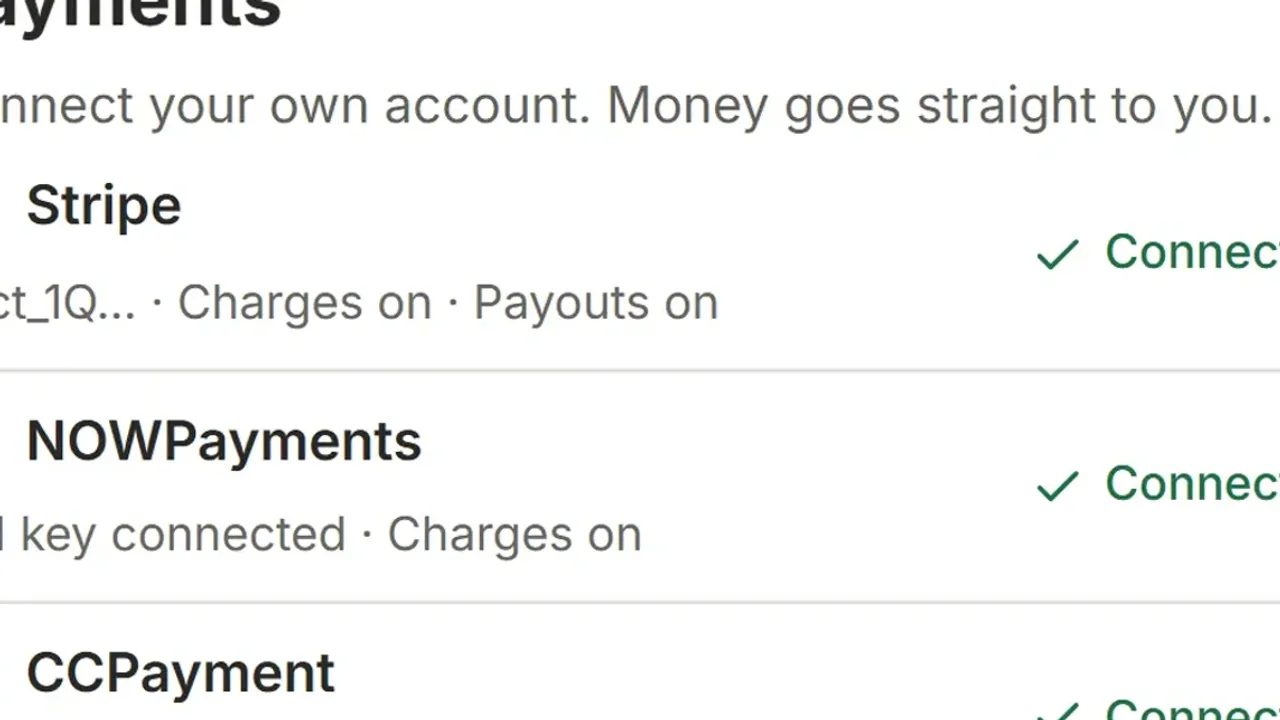
- A Stripe account in a country Stripe supports, connected under Payments. Optional: NOWPayments or CCPayment for crypto.
You do not create a BotFather bot or paste an API token for MemberPilot. You do connect payment accounts that belong to you.
How to set up monthly billing
1. Connect Stripe (and crypto if you want it)
In Payments, connect Stripe through Stripe’s hosted onboarding. Card sales settle to that connected account via Stripe Connect. Add NOWPayments or CCPayment only if you want crypto at checkout. Telegram Stars, PayPal, and Binance Pay are not available. If you still need a Stars sticker for a Telegram-native subscription, the Telegram Stars Pricing Calculator turns a target creator value into a Star amount; MemberPilot does not bill Stars.
2. Create a monthly offer tied to the group
Create an offer, point it at your private group, and set a monthly price. You can also offer yearly terms or a free trial on subscription offers. Trials can require a card up front or run without a card on a timer.
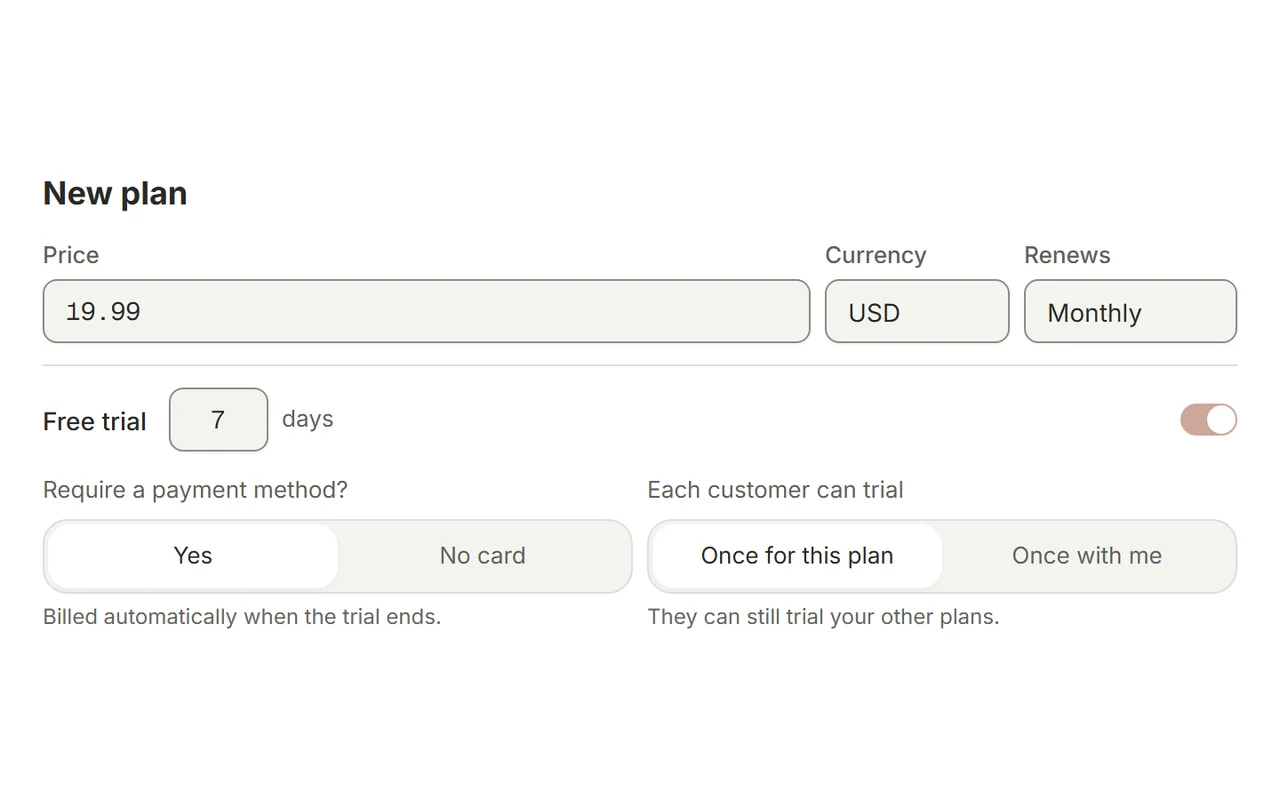
At checkout the customer sees your price plus the 5% MemberPilot service fee. A $20 month charges the customer $21. You keep $20 before provider processing fees.
3. Share the checkout link
Post the link in your free funnel: public channel, bio, pinned message, email. Buyers pay on the web checkout. For a concrete UI walkthrough, see the paid channel checkout example.
4. Automatic invite after payment
When payment confirms, the buyer receives a short-lived private invite. The bot approves joiners who still have active access. No permanent public invite to forward.
5. Automatic removal when the month ends
If they cancel, they keep the month they paid for. When that period ends, plus any grace you configured, they are removed. Grace defaults to 0 days. Card failures follow Stripe’s retry schedule; access still ends on your period and grace rules, not on the first decline alone. Details: grace periods and renewals and auto-removing expired members.
Pricing the month without guessing forever
Start from what you already charge elsewhere, or from the time you spend answering the group. For positioning ideas (not a magic number), see pricing a VIP Telegram channel. Raise price when the room is full of people who would pay more; do not raise it to fund a spreadsheet of manual kicks.
Card months vs crypto months
| Card (Stripe) | Crypto (NOWPayments / CCPayment) | |
|---|---|---|
| Billing | Recurring subscription on Stripe | Prepaid one period; buyer renews manually |
| Retries | Stripe’s own dunning | N/A; period simply ends |
| Refunds | In your Stripe account | Not reversible inside MemberPilot |
Full card deep dive: Telegram Stripe payments guide.
MemberPilot is an independent service and is not affiliated with or endorsed by Telegram.
Turn on the monthly offer
Connect Stripe, price one month, and share the checkout link. Invites and removals are the part you should never do by hand again.
Frequently asked questions
- How do I charge monthly for a private Telegram group?
- Create a private group, add a membership bot as admin, connect Stripe for cards (and crypto if you want it), set a monthly offer price, and share the checkout link. Paying members get invited automatically; expired ones are removed when the paid period ends.
- Can Telegram bill a monthly subscription by itself?
- No. Telegram does not run recurring card subscriptions for your VIP group. You connect your own Stripe account through a membership tool. Crypto, if offered, is prepaid one month at a time through NOWPayments or CCPayment.
- What happens at the end of the month if they cancel?
- They keep access until the period they already paid for ends. After that, plus any grace days you set (default is zero), they are removed from the group automatically.
- How much does MemberPilot take on a monthly plan?
- There is no monthly fee for creators. Customers pay a 5% MemberPilot service fee at checkout on top of your price. Stripe or crypto provider processing fees are separate. Sales settle to your connected accounts.
- Can I offer a free trial before the first month?
- Yes on subscription offers. A trial can require a card up front through Stripe, or run without a card on a timer. If a no-card trial ends with no paid period, access is removed.
Sources
- Stripe Connect documentation · Stripe
- Telegram Bot API reference · Telegram