
 Sign in with Telegram
Telegram Paid Channel Checkout Example (Live UX)
See a real paid Telegram channel checkout with card via Stripe and crypto via NOWPayments or CCPayment, plus what the buyer sees after paying.

Most “checkout examples” for paid Telegram channels are marketing mockups. You need the real path a buyer clicks: price, fee line, card or crypto, then a Telegram invite that is not a forever link sitting in someone’s Saved Messages.
This telegram paid channel checkout example walks the live MemberPilot UX: what the customer sees, which methods are actually available, where the money goes, and what happens in Telegram after the charge succeeds.
Key takeaways
- Checkout is a web page for your offer, not a Telegram Stars invoice.
- Live methods: card (Stripe) and crypto (NOWPayments or CCPayment) on accounts you connect.
- Customers pay your price plus a 5% MemberPilot service fee shown at checkout.
- After payment confirms, the buyer gets a short-lived invite; unpaid joiners are declined.
- Sales settle to your Stripe or crypto account. MemberPilot never holds your revenue.
The checkout screen buyers actually see
The checkout lists the offer name, the price you set, and the payment methods you enabled. Card runs through Stripe Connect on your connected account. Crypto runs through your own NOWPayments or CCPayment credentials. Methods you did not connect simply do not show.
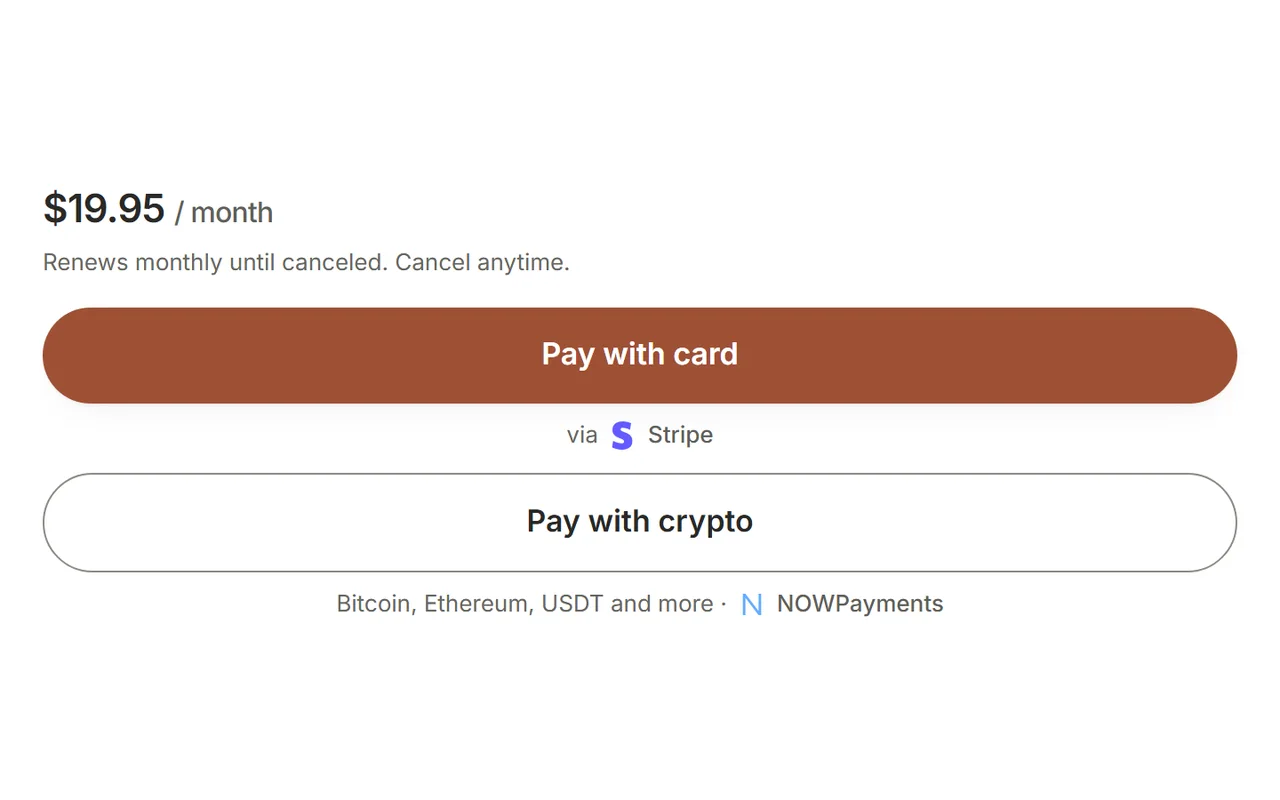
Example money math: you set $20/month. The customer pays $21. You keep $20 (before Stripe or crypto provider processing fees). There is no monthly platform fee for creators.
Telegram Stars, PayPal, and Binance Pay are not available on this checkout. If a competitor screenshot shows those logos, treat it as a different product.
Card path vs crypto path
Card. The buyer pays with a card on Stripe. For subscriptions, Stripe owns renewals and its own retry schedule when a card fails. MemberPilot controls Telegram access from the membership period and your grace settings (grace defaults to 0 days).
Crypto. The buyer pays one prepaid period at a time. There is no automatic crypto charge on a schedule. When that period ends (plus any grace), access ends unless they check out again. Crypto payments are not reversible inside MemberPilot the way card refunds are in Stripe.
For the full card setup, see how to accept Stripe payments in a Telegram group. For monthly group pricing and offer setup, see how to charge monthly for a private Telegram group.
What happens after “Payment successful”
Access waits on the provider webhook, not on the thank-you page alone. Once payment is confirmed, MemberPilot checks that the buyer has active access, then shares a short-lived private invite that uses Telegram join requests. The bot only approves buyers who still have access. There is no permanent public invite to forward.
If payment later fails or the period ends, removal follows the same rules as auto-removing expired members: period end, then grace (default zero), then kick with a path that still allows a later renewal.
Who holds the money on this example
You do.
- Card: settles to your connected Stripe account.
- Crypto: settles to your NOWPayments or CCPayment wallet.
- MemberPilot’s 5% is a customer-paid service fee at web checkout (with crypto providers that cannot split the fee in-payment, MemberPilot records the fee and bills it later through your MemberPilot billing method).
- MemberPilot does not keep a creator sales balance.
MemberPilot is an independent service and is not affiliated with or endorsed by Telegram.
What not to copy from random screenshots
Competitor or tutorial images often show Stars, PayPal, or in-Telegram invoices for recurring VIP access. That is not this checkout. If your launch checklist depends on those logos, change the checklist before you change the price.
Also skip “fake dashboard” mockups that invent MemberPilot screens. The checkout methods shot above is a real product surface from /features. Use it as the reference for what buyers select.
Fee line buyers will ask about
Creators sometimes hide the 5% and then get support tickets. Better: know the line item before launch day.
- Your offer price is what you keep (before Stripe or crypto provider fees).
- The customer-paid MemberPilot service fee is shown at web checkout.
- There is no monthly MemberPilot fee sitting in the background.
- Crypto that cannot split the fee in-payment still settles sales to you; MemberPilot records its fee and bills it later through your MemberPilot billing method.
Try the flow yourself
Connect Stripe (and crypto if you want both methods), create one offer, open your own checkout link, and pay with a test or small live charge. You will see the same method picker as the screenshot above, then the Telegram invite after confirmation. If you are still wiring the first offer, launch in about ten minutes covers the click path.
Start for free, check pricing, or contact us if your offer shape is unusual.
Frequently asked questions
- What does a Telegram paid channel checkout look like?
- Buyers open a web checkout for your offer, pick card or crypto, pay, then receive a short-lived Telegram invite after payment confirms. They do not pay inside a Telegram invoice for cards. The checkout shows your price plus the MemberPilot service fee.
- Which payment methods appear on checkout?
- Live methods are cards through your own Stripe account, and cryptocurrency through your own NOWPayments or CCPayment account. Telegram Stars, PayPal, and Binance Pay do not appear because they are not supported.
- Who pays the 5% fee on the example checkout?
- The customer. On a $20 plan the customer is charged $21. You keep the price you set. There is no monthly fee for creators. Provider processing fees from Stripe or your crypto provider are separate.
- Does MemberPilot hold the money from checkout?
- No. Card sales settle to your connected Stripe account. Crypto settles to your NOWPayments or CCPayment wallet. MemberPilot never holds creator revenue and does not keep a sales balance for you.
- What happens right after a successful payment?
- When the payment webhook confirms, the buyer gets a short-lived private invite for your channel or group. Access is not granted from the thank-you page alone. If they later stop paying, they are removed when the paid period and grace end.
Sources
- Stripe Connect documentation · Stripe
- Telegram Bot API reference · Telegram